

Stop Wasting Money on the Wrong Web Host: A Real-World Guide
Back when I started my very first blog, I fell straight into the classic beginner trap. I bought an ultra-cheap hosting plan for only 1 USD a month because the bright promotional banner promised me the moon. I spent three solid weeks writing articles, tweaking colors, and setting up my pages. Then came launch day. I proudly sent the link to a group chat of friends and family. Just six people clicked the link at the exact same minute, and the entire server instantly crashed.
My screen showed a blank white error, and I had no clue what went wrong. When I contacted customer support, an automated bot told me I had exceeded my hidden CPU limits and needed to pay 50 USD right away to unlock my site. I felt angry, stuck, and totally ripped off.
If you are building a new website today, I do not want you to go through that same headache. Picking a server should not feel like gambling with your hard work. In this guide, I will break down how web servers actually work in plain everyday English, share the costly traps you need to avoid, and help you pick the exact right setup for your budget today.
📌 Quick Cheatsheet: What You Need to Know in 30 Seconds
- Shared Hosting: Best for brand new blogs and hobby sites under 10,000 monthly visits. Very cheap, but you share power with hundreds of other sites.
- VPS Hosting: Perfect for small businesses and growing stores. You get your own private space and dedicated memory that neighbors cannot touch.
- Cloud Hosting: The top pick for fast-growing apps and viral stores that need zero downtime and fast automatic scaling.
- The Golden Rule: Never buy hosting based on cheap first-year discounts alone. Always check the real renewal price and make sure you get free automated daily backups.
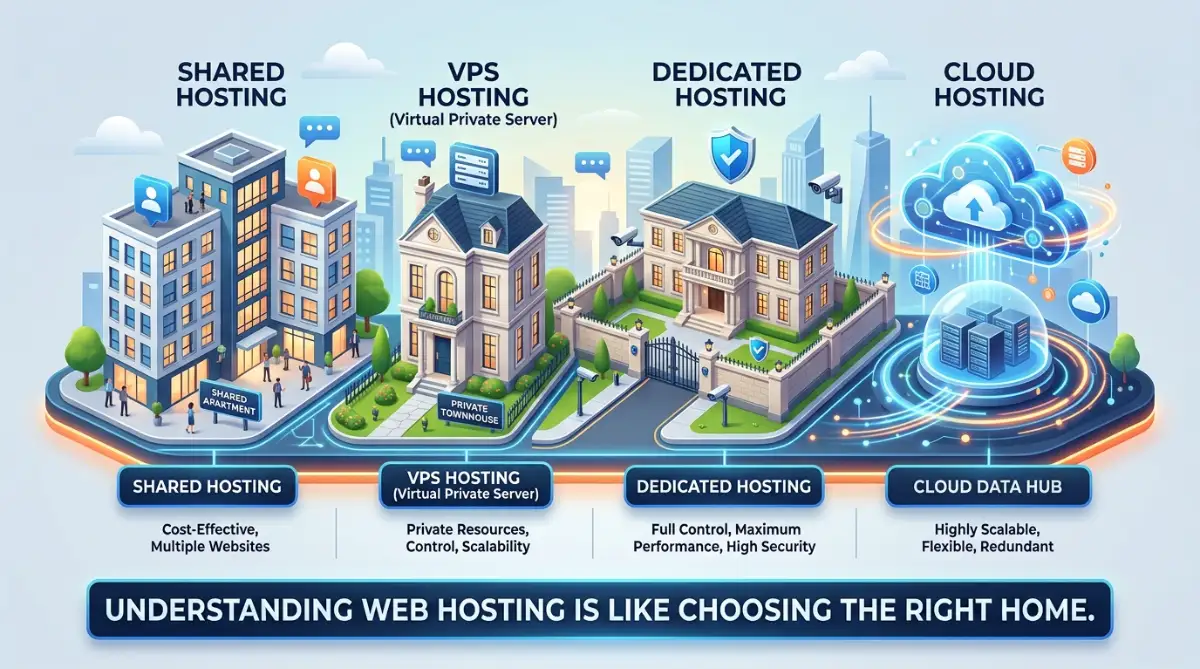
Image Caption: Think of shared hosting as living with roommates, while a VPS gives you your own private townhouse. Visualizing your server setup makes it so much easier to pick the right digital home for your content!
Demystifying Web Hosting: The Simple House Analogy
To make the right choice, you first need to understand what web hosting actually is.
Think of your website as a collection of digital files, images, and text. For people to see these files, they must live on a computer that is always turned on and connected to the internet.
This special computer is called a server.
Renting space on this server is what we call buying web hosting.
Let us use a simple real estate analogy to make this easy.
Imagine you want to open a physical shop in your town.
You have a few different ways to rent your physical space:
- You can rent a small desk in a busy, shared open-office space.
- You can rent your own private apartment inside a larger residential building.
- You can rent a whole private building all to yourself.
- You can join a modern co-op network that shares spaces across the whole city.
Each of these choices matches a specific type of web hosting.
Let us look closely at each option so you can find the perfect match for your needs.
Exploring Your Options: The Main Types of Web Hosting Explained
Finding your perfect hosting match comes down to understanding how different servers handle your website files. Over my years of building and launching websites, I’ve learned that beginners succeed much faster when they start with the right setup from day one. Let's walk through the five core hosting options you'll encounter on the market today so you can choose with total confidence.
If you want a quick visual walkthrough of how shared, VPS, and cloud hosting compare in real life, watch this short video breakdown. It makes choosing the right setup so much easier before you read the rest of our guide below!
1. Shared Hosting – The Budget-Friendly Apartment
Shared hosting is the most popular choice for brand new websites.
In this setup, your website lives on a single server along with hundreds of other websites.
You share all the resources of this server, including the memory, disk space, and processing power.
It is just like renting a small room in a large shared apartment with many roommates.
- The Pros: It is incredibly cheap, easy to set up, and requires zero technical skills to manage.
- The Cons: If another website on your server gets a massive spike in traffic, your site might slow down or crash.
- Who is it for? This is perfect for brand new personal blogs, small portfolio sites, and local hobby projects with low traffic.
2. VPS (Virtual Private Server) Hosting – The Townhouse
VPS hosting is the next step up from shared plans.
With a VPS, you still share a physical server with other users, but the server is split into isolated virtual sections.
Your website gets its own dedicated slice of resources that no one else can touch.
It is like renting a private townhouse in a gated community.
- The Pros: You get stable speeds, better security, and your site will not suffer because of your neighbors.
- The Cons: It costs more than shared plans, and you might need some basic technical skills to run it.
- Who is it for? This is ideal for growing blogs, small business sites, and basic online shops that need steady performance.
With a VPS, even if your neighbor has a busy day, your private townhouse remains quiet and untouched.
You have your own front door, your own kitchen, and your own dedicated resources.
3. Dedicated Hosting – The Private Mansion
With dedicated hosting, you rent an entire physical server solely for your website.
You do not share any resources, space, or power with anyone else on the planet.
It is like owning a massive private mansion with a big security fence.
- The Pros: You get maximum speed, top-tier security, and complete control over every single setting.
- The Cons: It is highly expensive and requires professional technical knowledge to manage and maintain.
- Who is it for? This is built for large online stores, major government sites, and high-traffic portals.
If you are just starting a new blog, buying a dedicated server is like buying a 50-room mansion for just one person.
It is a massive waste of your hard-earned budget.
4. Cloud Hosting – The Smart Co-op Network
Cloud hosting is a modern and highly reliable technology.
Instead of your website living on just one physical computer, it is saved on a massive network of connected servers.
If one server in the network fails, another one immediately takes its place to keep your site online.
It is like having a team of delivery drivers spread across the city.
- The Pros: You get nearly perfect uptime, and you can easily scale up your resources with a single click.
- The Cons: The pricing can sometimes be unpredictable because you often pay for exactly what you use.
- Who is it for? This is perfect for fast-growing startups, busy app developers, and online shops with unpredictable traffic spikes.
If your site gets featured on a major news network, cloud hosting automatically pulls power from other servers.
Your site stays online, fast, and completely responsive without any manual work.
5. Managed WordPress Hosting – The Hands-Off VIP Option
If you plan to build your site entirely with WordPress and hate dealing with technical maintenance, managed hosting is made for you. Think of it like renting a room where the staff cleans up every day, washes the dishes, and fixes the locks automatically. The host takes care of WordPress updates, daily security checks, speed caching, and performance tweaks for you.
- The Good: Your pages load super fast, security is tight, and support agents are actual WordPress pros who can fix errors in minutes.
- The Bad: It costs more than regular shared plans, and you cannot host custom non-WordPress scripts on these servers.
- Who Should Buy It: Busy bloggers, business owners, and creators who want a fast, secure website without spending their weekends fixing broken plugins or database errors.
Key Technical Factors to Watch When Comparing Hosts
Here is a practical lesson I learned the hard way: never buy a plan based on the huge discount banner alone. Always test the host's live support chat on a Sunday afternoon with a tricky question to see if real humans actually reply. If their support team takes hours to answer before you even pay them, run away fast!
Understanding the main types of servers is only the first step of your journey. To get the best performance, you need to look at the small details of your plan. Let us break down the exact technical features that will keep your website running fast.
Uptime Guarantees and What They Really Mean
Every single server company will promise you a 99.9% uptime guarantee. This sounds amazing on paper, but you must look at the actual math. A 99.9% uptime rate means your website could still go offline for almost nine hours every single year.
If your site is down during a major sales event, you will lose both money and trust. Always look for providers that promise at least a 99.99% uptime guarantee. You can track your actual performance using free external monitoring tools after you sign up.
Storage Space vs. Monthly Bandwidth Limits
Storage is the physical space where your images, databases, and page files live. Think of storage as the physical hard drive inside your personal home computer. If you plan to run a basic blog, you do not need hundreds of gigabytes of disk space.
On the other hand, bandwidth is the amount of data your site can transfer to visitors. If your page is large and thousands of people visit it, your bandwidth needs will quickly jump. When you are choosing your hosting plan shared vs vps vs dedicated servers, make sure you match your traffic goals with your resource limits.
Customer Support Channels and Fast Response Times
Imagine your website crashes at two in the morning before a big product launch. You need to talk to a real human helper immediately to fix the issue. If your provider only offers slow email tickets, you might wait for days to get a basic reply.
Test their support channels before you pay for any service on their platform. Send them a simple technical question through their live chat portal on a weekend. See how fast they answer and whether they give a helpful, human response.
If you're running a commercial site and want my handpicked provider recommendations, check out my comprehensive guide on the Best Web Hosting Providers for Small Businesses. I break down the exact companies that deliver