

Why Auto Mode Keeps Ruining Your Best Photos (And How to Fix It)
I still remember the exact moment I almost smashed my first camera against the rocks. I was standing on a windy cliff at sunset with my family, trying to capture this unreal golden sky over the ocean. I kept my camera locked in Auto mode, pressed the shutter, and BAM—the tiny pop-up flash snapped open, blinded my kids, and fired a harsh, ghostly white beam across the frame.
The photo looked awful. The colors were completely washed out, the background turned pitch black, and digital grain covered their faces. I felt like an idiot standing there with a $900 camera that took worse pictures than my phone.
Here is the dirty secret camera brands never tell you: Auto mode does not know what you are looking at. It is just a mini computer guessing how to turn your entire world into a flat, boring gray slab. When you let the camera make decisions for you, you miss spontaneous smiles, get blurry indoor shots, and lose all the warm, rich colors you see with your own eyes.
I spent two full years fighting my dials until I figured out how simple manual mode actually is. Let me show you how to take full control of your camera in three basic steps—without getting lost in confusing math or heavy technical jargon.
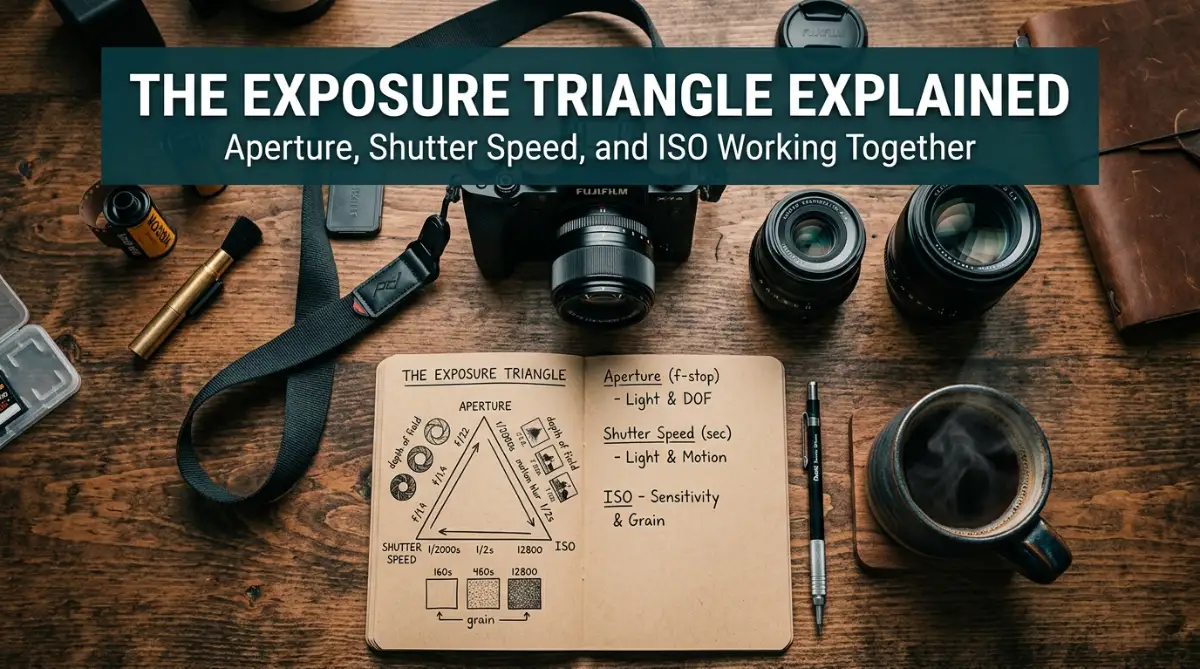
⚡ 60-Second Quick Takeaways
- Aperture controls light & blur: Small f-numbers (f/1.8) create dreamy blurry backgrounds; large f-numbers (f/8 to f/11) keep everything sharp.
- Shutter speed controls movement: Set it fast (1/1000s) to freeze running kids or pets, and keep it above 1/125s for hand-held shots.
- ISO is your brightness dial: Keep it at 100 on sunny days, but never hesitate to push it to 1600 or 3200 inside dark rooms to avoid blur.
- The 3-Step Setup Rule: Pick your main creative priority first (Aperture or Shutter), dial the other to balance depth, then use ISO to center your light meter at zero.
Deconstructing Exposure: How Your Camera Really Sees Light
To take back control, you need to understand how light enters your camera housing. Exposure is simply the total amount of light that reaches your digital image sensor during a shot. If too little light enters, your picture ends up dark and shadowy. If too much light enters, your highlights blow out into harsh white spots that cannot be fixed later.
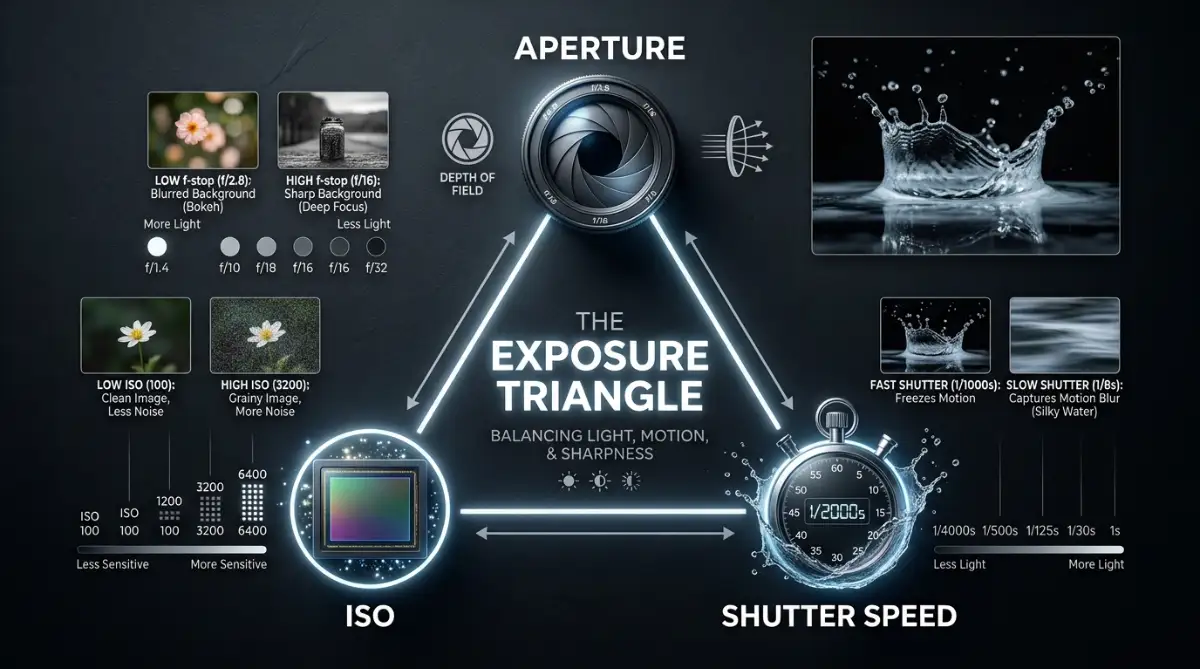
Three separate camera settings work in harmony to control this incoming light balance. Photographers call this trio the exposure triangle. Once you understand how these three controls talk to each other, shooting in manual mode becomes second nature.
Aperture: Controlling Depth and Light Intake
Think of your lens aperture exactly like the iris of your eye. When you walk into a dark basement, your eye pupil opens wide to soak up every drop of available light. When you walk outside onto a sunny beach, your pupil shrinks down to a tiny pinhole so you do not get blinded.
On your camera, we track this opening size using f-stop numbers. This is where most people get tripped up: a small number means a huge physical opening. When I shoot portraits of my friends and want that creamy, out-of-focus background where they pop off the screen, I dial my lens down to f/1.8 or f/2.8. But when I stand in front of an epic mountain valley and want every tree, rock, and cloud sharp from edge to edge, I set my dial between f/8 and f/11.
Shutter Speed: Freezing Time or Capturing Motion
Shutter speed describes how long the mechanical curtain inside your camera stays open to collect light. We measure shutter speed in fractions of a second, like 1/1000s, 1/250s, or 1/4s.
Fast shutter speeds like 1/1000 of a second open and close instantly. They slice time into tiny slices, freezing fast dogs, running children, or water splashes completely still. However, because the shutter stays open for a split second, very little light reaches the sensor.
Slow shutter speeds like 1/4 of a second allow light to pour into the sensor for a longer period. This works wonderfully when shooting dark outdoor scenes with a steady tripod. The trade-off is that any physical movement during that time creates soft motion blur across your photo.
ISO: The Digital Sensitivity Factor
ISO represents how strongly your digital camera sensor amplifies the incoming light signal. Think of ISO like a volume slider for your image brightness. Standard base settings usually start around ISO 100 on most modern cameras.
Low ISO values like 100 or 200 produce clean, sharp, and noise-free image files. They require plenty of bright natural light outdoors to work properly. This should always be your baseline starting point whenever you step outside on a clear morning.
When shooting inside dim rooms or during late evenings, you can raise your ISO value to 1600, 3200, or higher. This boosts image brightness without changing your aperture or shutter speed settings. However, pushing ISO too high introduces grainy digital noise that can reduce overall picture sharpness.
How to Read Your Camera Exposure Meter Like a Pro
Before you press the shutter button, your camera offers a built-in light meter to guide your decisions. You can view this scale inside your viewfinder screen or on your rear LCD panel. It looks like a small horizontal ruler with a zero in the center and numbers ranging from negative three to positive three.
Camera Light Meter Indicator
-3
•
-2
•
-1
•
0
•
+1
•
+2
•
+3
◄ Underexposed (Too Dark)
Balanced Exposure
Overexposed (Too Bright) ►
When the indicator mark sits on the negative side, your frame is underexposed and too dark. When it shifts to the positive side, your photo will turn out overexposed and overly bright. Your primary goal in manual shooting mode is balancing this meter indicator straight toward the center zero line.
Understanding the Zero Point
The zero mark represents a neutral, balanced exposure calculated by your camera's light brain. It averages out all light and dark regions inside your current frame to calculate neutral tone values.
However, the zero mark is not an absolute rule you must blindly obey at all times. If you shoot a dark moody street scene, your meter should deliberately sit slightly on the negative side. If you capture bright white snowy hills, your meter needs to sit slightly above zero, so the snow stays white instead of turning dull gray.
Spot vs Evaluative Metering Modes
Your camera measures light across the frame using different metering patterns. Evaluative or Matrix metering reads light across your whole view, which works great for general outdoor everyday photos. It tries to strike a fair compromise between dark shadows and bright skies.
Spot metering reads light from a tiny dot right in the center of your view. This setting gives you surgical accuracy when your subject stands against a harsh bright background. By switching to spot metering, you tell your camera to ignore the background and light your main subject accurately.
Myth vs Reality: Manual Exposure Breakdown
Many new camera owners feel intimidated by manual exposure mode because of common photography misconceptions. Let us break down the common myths versus the actual reality of operating your camera controls manually.