
The Real Problems Developers Face When Adding AI to Their Web Apps
Building a modern web application feels incomplete without AI capabilities these days. But here's the thing: most developers get stuck before they even start.
You've probably had that moment. You've built your website or web app, and you realize you need to add something powerful—like an AI chatbot, content generation, or code assistance. You google "OpenAI API integration," find fifty tutorials, and immediately feel overwhelmed.
The problem? Different tutorials use different languages. Some are outdated. Others assume you already know things you don't. And worst of all, many don't explain the "why" behind each step, leaving you copying code you don't actually understand.
This confusion costs you something valuable: time and confidence.
Why Most Developers Struggle (And It's Not Their Fault)
When you search for OpenAI API integration guides, you discover something frustrating:
- Documentation written for experts. OpenAI's official docs are thorough, but they assume you know about API authentication, environment variables, and HTTP requests. If you're new to APIs, you're lost.
- Tutorials that skip the basics. Many guides jump straight into code without explaining what each part does. You end up copy-pasting without understanding.
- Conflicting information everywhere. Some guides use outdated API versions. Others mix multiple programming languages in confusing ways.
- Missing real-world context. Most tutorials show you a basic example but never explain how to handle errors, manage costs, or scale your implementation.
- Security concerns left unaddressed. Nobody talks about protecting your API keys or preventing misuse of your endpoints.
- No troubleshooting help. When something breaks (and it will), you're left debugging alone.
These barriers create a painful reality: developers waste hours trying to integrate a tool that should take minutes.
The Hidden Cost of Getting This Wrong
This isn't just about technical frustration. It's about lost opportunity.
When you can't successfully integrate OpenAI API, you lose:
- Competitive advantage. Your competitors are already building AI features. Every day you delay is a day they pull ahead.
- User engagement. Modern users expect AI-powered features. Without them, your app feels outdated compared to what they use elsewhere.
- Revenue potential. AI-powered features drive user retention and enable premium offerings you couldn't monetize before.
- Professional credibility. You start doubting your abilities as a developer, even though the problem isn't you—it's the information you're given.
- Momentum. One failed attempt kills your enthusiasm to try again. You move on to "easier" projects.
The worst part? This integration is actually not that hard once someone breaks it down properly. You're not missing skill—you're missing clarity.
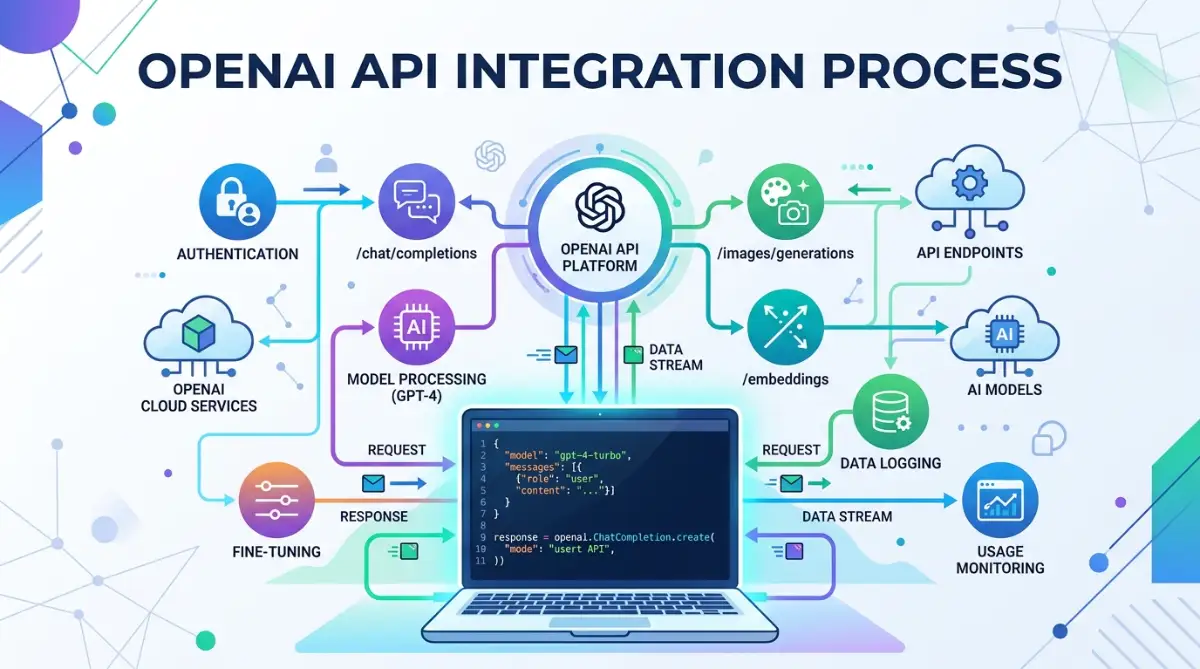
How to Successfully Connect OpenAI API to Your Web Application
Now let's fix this. The following steps will guide you from zero to a working OpenAI API integration. You'll understand every piece, and you'll be able to customize it for your specific needs.
Step 1: Get Your API Keys and Understand What They Actually Do
Before you write a single line of code, you need to understand the authentication system. It's simpler than you think.
Go to openai.com and log into your account (create one if needed). Navigate to the API section and find your API keys. This key is like a password—it proves to OpenAI that your request is legitimate and that your account should be charged for the API usage.
Here's what people get wrong: They treat API keys casually. They paste the key directly into their code, upload it to GitHub, and suddenly someone else is racking up charges on their account. Don't do this.
Instead, use environment variables. These are special variables your code reads from a secure location, not from your actual code files.
In Node.js/JavaScript, create a .env file in your project root:
OPENAI_API_KEY=sk-your-actual-key-here
Never commit this file to GitHub. Add it to your .gitignore file first.
Then in your code, use a package like dotenv to load it:
javascript
require('dotenv').config();
const apiKey = process.env.OPENAI_API_KEY;
In Python, do the same thing:
python
import os
from dotenv import load_dotenv
load_dotenv()
api_key = os.getenv('OPENAI_API_KEY')
Why this matters: This simple step keeps your account secure. It also makes your code portable—you can share your code without sharing your credentials.
Step 2: Choose Your Programming Language and Install the Official Client Library
OpenAI provides official client libraries for JavaScript and Python. These libraries handle all the complicated HTTP requests behind the scenes, so you can focus on your logic.
For Python:
pip install openai
For JavaScript/Node.js:
npm install openai
These libraries do something important: they handle all the API communication details. Without them, you'd need to manually construct HTTP requests, handle authentication headers, and parse responses. The library does this automatically.
Why is this important? It means you can go from zero to working in minutes instead of hours. And your code will be cleaner and less error-prone.
If you're using a different language (like PHP or Go), OpenAI has community-maintained libraries. Find them on the official OpenAI GitHub repository.
A quick note: Always use the latest version of these libraries. OpenAI updates them regularly with bug fixes and new features. Check your library version occasionally and update when new versions come out.
Step 3: Make Your First API Call and Understand What's Happening
Now you're ready to send your first request. Let's start simple.
Python example:
python
from openai import OpenAI
client = OpenAI(api_key="your-key-here")
response = client.chat.completions.create(
model="gpt-4",
messages=[
{"role": "system", "content": "You are a helpful assistant."},
{"role": "user", "content": "Explain API integration in simple terms."}
]
)
print(response.choices[0].message.content)
JavaScript example:
javascript
const OpenAI = require('openai');
const client = new OpenAI({
apiKey: process.env.OPENAI_API_KEY
});
async function chat() {
const response = await client.chat.completions.create({
model: "gpt-4",
messages: [
{ role: "system", content: "You are a helpful assistant." },
{ role: "user", content: "Explain API integration in simple terms." }
]
});
console.log(response.choices[0].message.content);
}
chat();
What's happening here:
The messages parameter is a list of all the conversational context. The system message sets the AI's personality or instructions. The user message is what the user actually asks.
The API returns a response object. Inside it, you'll find choices[0].message.content—that's the AI's actual answer.
A crucial detail: Always use await in JavaScript (or handle promises properly) because API calls take time. Your code can't move forward until the API responds. This is why async/await is important—it lets your program do other things while waiting.
Step 4: Handle Errors Like a Professional
Real applications crash because of missing error handling. Let's fix that now.
What if your API key is wrong? What if the internet goes down? What if OpenAI's servers are temporarily unavailable? Your code needs to handle these gracefully.
Python error handling:
python
from openai import OpenAI, APIError
client = OpenAI(api_key=os.getenv('OPENAI_API_KEY'))
try:
response = client.chat.completions.create(
model="gpt-4",
messages=[
{"role": "user", "content": "Hello"}
]
)
print(response.choices[0].message.content)
except APIError as e:
print(f"OpenAI API returned error: {e.status_code}")
print(f"Error details: {e.message}")
JavaScript error handling:
javascript
async function safeChat() {
try {
const response = await client.chat.completions.create({
model: "gpt-4",
messages: [{ role: "user", content: "Hello" }]
});
console.log(response.choices[0].message.content);
} catch (error) {
if (error.status === 401) {
console.error("API key is invalid");
} else if (error.status === 429) {
console.error("Rate limit exceeded. Wait before trying again.");
} else {
console.error("API error:", error.message);
}
}
}
Why errors matter: Without error handling, your users see confusing crashes instead of helpful messages. With proper error handling, you can tell them "Service temporarily unavailable" instead of letting your app break silently.
Step 5: Integrate Into Your Web Application Frontend
So far, we've been using scripts. But your real application probably has users accessing it through a web browser. Here's how to connect the API to an actual web app.
Never call the OpenAI API directly from your frontend JavaScript code. Why? Because you'd have to put your API key in your browser's code, and anyone could steal it.
Instead, create a backend endpoint that your frontend calls. Your backend handles the actual OpenAI communication and returns only the result.
Here's a simple
Express.js backend example:
javascript
const express = require('express');
const OpenAI = require('openai');
require('dotenv').config();
const app = express();
app.use(express.json());
const client = new OpenAI({
apiKey: process.env.OPENAI_API_KEY
});
app.post('/api/chat', async (req, res) => {
try {
const userMessage = req.body.message;
const response = await client.chat.completions.create({
model: "gpt-4",
messages: [
{ role: "user", content: userMessage }
]
});
res.json({
success: true,
reply: response.choices[0].message.content
});
} catch (error) {
res.status(500).json({
success: false,
error: error.message
});
}
});
app.listen(3000, () => console.log('Server running on port 3000'));
From your frontend HTML, call this endpoint:
javascript
async function sendMessage(userMessage) {
const response = await fetch('/api/chat', {
method: 'POST',
headers: { 'Content-Type': 'application/json' },
body: JSON.stringify({ message: userMessage })
});
const data = await response.json();
return data.reply;
}
The advantage: Your API key stays secure on your server. Users never see it. And you can add rate limiting, logging, and cost controls on your backend.
Step 6: Understand API Costs and Set Spending Limits
This is critical, and many developers miss it. OpenAI charges by the token—roughly 4 characters per token. More complex requests cost more.
A typical chat message costs just a few cents, but poorly written code can make thousands of requests. One developer forgot to add error handling, got stuck in a loop, and racked up $2000 in charges before noticing.
Set up billing controls immediately:
- Go to your OpenAI account settings
- Navigate to Billing → Usage limits
- Set a hard monthly limit (for example, $20)
- Set up email alerts for usage milestones
Also, monitor which model you're using. gpt-3.5-turbo is much cheaper than gpt-4, but slower. For most applications, gpt-3.5-turbo is a smart choice to start.
Track costs in your code:
python
response = client.chat.completions.create(
model="gpt-3.5-turbo", # Cheaper than gpt-4
messages=[{"role": "user", "content": "Hello"}],
temperature=0.7, # Lower = more consistent, higher = more creative
)
# Log token usage
print(f"Tokens used: {response.usage.total_tokens}")
print(f"Input tokens: {response.usage.prompt_tokens}")
print(f"Output tokens: {response.usage.completion_tokens}")
This logging helps you understand which features cost the most and where you might optimize.
Step 7: Add Context and Conversation History for Better Responses
The real power of OpenAI comes when you give it context. A single isolated question produces mediocre answers. But a full conversation with history produces smart, tailored responses.
Here's how to maintain conversation history:
python
conversation_history = [
{"role": "system", "content": "You are a helpful customer support agent for a software company."}
]
def chat_with_history(user_message):
# Add user's new message to history
conversation_history.append({
"role": "user",
"content": user_message
})
# Send entire history to API
response = client.chat.completions.create(
model="gpt-3.5-turbo",
messages=conversation_history
)
assistant_message = response.choices[0].message.content
# Add assistant's response to history for next call
conversation_history.append({
"role": "assistant",
"content": assistant_message
})
return assistant_message
Important limitation: Sending entire conversation history every time gets expensive as conversations get long. For production apps, consider:
- Storing conversation history in a database
- Summarizing old messages and replacing them with a summary
- Limiting history to the last 20 messages
This technique makes your AI much more useful but also requires thoughtful architecture.
Key Takeaways: Your Action Plan
You now understand the complete process. Here's what you need to do today:
- Get your API key from OpenAI's dashboard and store it securely using environment variables
- Install the client library for your programming language
- Write a test script that makes one successful API call
- Add error handling so your code doesn't crash unexpectedly
- Move the API call to your backend if you're building a web application
- Set spending limits to protect your account
- Plan for conversation history if you're building a chat feature
The integration itself is straightforward. What matters is understanding each piece so you can customize it for your specific needs.
Start small. Get one feature working. Then expand from there.
Taking Your OpenAI Integration to Production-Level Performance
You've got the basics down. Your first API call works. But now comes the real challenge: making your integration reliable, efficient, and ready for real users.
This is where most developers get stuck. The difference between a test script and a production application isn't just code—it's architecture, planning, and anticipating what could go wrong.
Let's cover the advanced techniques that separate working solutions from professional ones.
Building Rate Limiting and Request Queuing Into Your System
Here's a scenario: Your app launches on social media and gets ten thousand users in a day. Without proper request management, your API quota gets eaten instantly, and all those users see errors.
Rate limiting is your safety net. It controls how many requests your system sends in a given time period.
The basic concept: OpenAI allows a certain number of requests per minute depending on your plan. If you exceed that, they reject your requests temporarily. You need to handle this gracefully.
Python
import time
from datetime import datetime, timedelta
class RateLimiter:
def __init__(self, requests_per_minute=60):
self.requests_per_minute = requests_per_minute
self.request_times = []
def wait_if_needed(self):
now = datetime.now()
# Remove old requests outside the time window
self.request_times = [
req_time for req_time in self.request_times
if now - req_time < timedelta(minutes=1)
]
if len(self.request_times) >= self.requests_per_minute:
sleep_time = 60 - (now - self.request_times[0]).total_seconds()
if sleep_time > 0:
time.sleep(sleep_time)
self.request_times.append(now)
# In your code:
limiter = RateLimiter(requests_per_minute=30)
def make_api_call():
limiter.wait_if_needed()
# Make your API call here
response = client.chat.completions.create(...)
return response
JavaScript version using a queue:
javascript
class RequestQueue {
constructor(maxRequestsPerMinute = 30) {
this.maxRequests = maxRequestsPerMinute;
this.requests = [];
this.queue = [];
}
async add(fn) {
return new Promise((resolve) => {
this.queue.push({ fn, resolve });
this.process();
});
}
async process() {
if (this.queue.length === 0) return;
const now = Date.now();
this.requests = this.requests.filter(
time => now - time < 60000
);
if (this.requests.length < this.maxRequests) {
const { fn, resolve } = this.queue.shift();
this.requests.push(now);
resolve(await fn());
this.process();
} else {
setTimeout(() => this.process(), 1000);
}
}
}
const queue = new RequestQueue(30);
// Use it like this:
queue.add(async () => {
return await client.chat.completions.create({
model: "gpt-3.5-turbo",
messages: [{ role: "user", content: "Hello" }]
});
});
Rate limiting prevents your account from getting temporarily suspended. It also gives you predictable performance—users experience consistent response times instead of random failures.
Implementing Smart Caching to Reduce API Calls and Costs
Here's an insight: Many questions people ask are the same. If two users ask "What is artificial intelligence?", you don't need to call the API twice.
Caching stores previous API responses so you can reuse them without making new API calls. This cuts costs dramatically.
python
import json
from functools import lru_cache
import hashlib
class ResponseCache:
def __init__(self, max_size=1000):
self.cache = {}
self.max_size = max_size
def get_cache_key(self, user_message, system_message=""):
# Create a unique key based on the messages
combined = f"{system_message}|{user_message}"
return hashlib.md5(combined.encode()).hexdigest()
def get(self, user_message, system_message=""):
key = self.get_cache_key(user_message, system_message)
return self.cache.get(key)
def set(self, user_message, response, system_message=""):
if len(self.cache) >= self.max_size:
# Remove oldest entry when cache is full
self.cache.pop(next(iter(self.cache)))
key = self.get_cache_key(user_message, system_message)
self.cache[key] = response
# Usage:
cache = ResponseCache()
def get_response(user_message):
# Check cache first
cached = cache.get(user_message)
if cached:
print("Returning cached response")
return cached
# Not in cache, call API
response = client.chat.completions.create(
model="gpt-3.5-turbo",
messages=[{"role": "user", "content": user_message}]
)
reply = response.choices[0].message.content
cache.set(user_message, reply)
return reply
Real-world impact: One development company implemented caching and cut their OpenAI costs by 40% in the first month. Users also got instant responses for common questions instead of waiting for API calls.
Important limitation: Caching works best for deterministic responses. If you're using the API for creative tasks (writing stories, generating variations), caching might not help. Use it for factual questions, code explanations, and FAQ-style responses.
Streaming Responses for Better User Experience
One frustration users have with AI chatbots is waiting for the entire response. The API takes five seconds, and the user gets nothing until then.
Streaming solves this. Instead of waiting for the complete response, you show text as it arrives—like a typewriter effect.
python
def stream_response(user_message):
stream = client.chat.completions.create(
model="gpt-3.5-turbo",
messages=[{"role": "user", "content": user_message}],
stream=True # Enable streaming
)
full_response = ""
for chunk in stream:
# Each chunk contains a piece of the response
if chunk.choices[0].delta.content:
text = chunk.choices[0].delta.content
full_response += text
print(text, end="", flush=True) # Print immediately
return full_response
JavaScript streaming:
javascript
async function streamResponse(userMessage) {
const stream = await client.chat.completions.create({
model: "gpt-3.5-turbo",
messages: [{ role: "user", content: userMessage }],
stream: true
});
let fullResponse = "";
for await (const chunk of stream) {
const content = chunk.choices[0]?.delta?.content;
if (content) {
fullResponse += content;
// Send to frontend to display (typewriter effect)
emitToClient(content);
}
}
return fullResponse;
}
In your web app: This creates a professional feel. Instead of frozen UI, users see the AI "thinking" and typing out responses in real-time.
Monitoring and Logging for Production Safety
You can't manage what you don't measure. As your application scales, you need visibility into what's happening.
What to log:
- Response time: How long each API call takes
- Token usage: How many tokens each request consumes (for cost tracking)
- Error types: What kinds of errors occur and how often
- User behavior: Which features get used most
python
import logging
from datetime import datetime
# Set up logging
logging.basicConfig(
filename='api_logs.log',
level=logging.INFO,
format='%(asctime)s - %(levelname)s - %(message)s'
)
def make_logged_call(user_message, user_id):
start_time = datetime.now()
try:
response = client.chat.completions.create(
model="gpt-3.5-turbo",
messages=[{"role": "user", "content": user_message}]
)
elapsed = (datetime.now() - start_time).total_seconds()
tokens_used = response.usage.total_tokens
logging.info(
f"User: {user_id} | "
f"Time: {elapsed}s | "
f"Tokens: {tokens_used} | "
f"Model: gpt-3.5-turbo"
)
return response
except Exception as e:
logging.error(f"API error for user {user_id}: {str(e)}")
raise
Why monitoring matters: One developer noticed through logs that a specific feature was using 10x more tokens than expected. By investigating, they found a bug that was sending the entire conversation history instead of just recent messages. Fixing it saved thousands monthly.

Selecting the Right Model for Your Use Case
Not every task needs GPT-4. Choosing the right model saves money and improves performance.
gpt-4o-mini: Fastest and cheapest. Good for most conversational tasks, simple questions, and customer support. Most developers should start here.
GPT-4: Most capable but slower and more expensive. Use for complex reasoning, code generation, creative writing, or when accuracy matters most.
Fine-tuning (custom models): If you're making thousands of API calls with similar patterns, you can train a custom model. It's more expensive upfront but saves money long-term at scale.
python
# Choosing models dynamically based on task complexity
def choose_model(task_type):
if task_type == "customer_support":
return "gpt-3.5-turbo" # Speed matters, perfect accuracy isn't critical
elif task_type == "code_generation":
return "gpt-4" # Needs to work correctly
elif task_type == "math_or_logic":
return "gpt-4" # Complex reasoning
else:
return "gpt-3.5-turbo" # Safe default
# In your API call:
model = choose_model(task_type="customer_support")
response = client.chat.completions.create(
model=model,
messages=[{"role": "user", "content": user_message}]
)
Setting Up Proper Database Storage for Conversations
As conversations grow, storing them in memory fails. You need a real database.
Most developers use PostgreSQL (open-source, free) or MongoDB (document-based, also free tier available).
python
import sqlite3 # Simple example using SQLite
def save_conversation(user_id, user_message, assistant_response):
conn = sqlite3.connect('conversations.db')
cursor = conn.cursor()
cursor.execute('''
CREATE TABLE IF NOT EXISTS conversations (
id INTEGER PRIMARY KEY,
user_id TEXT,
user_message TEXT,
assistant_response TEXT,
timestamp DATETIME DEFAULT CURRENT_TIMESTAMP
)
''')
cursor.execute('''
INSERT INTO conversations (user_id, user_message, assistant_response)
VALUES (?, ?, ?)
''', (user_id, user_message, assistant_response))
conn.commit()
conn.close()
def get_user_history(user_id, limit=10):
conn = sqlite3.connect('conversations.db')
cursor = conn.cursor()
cursor.execute('''
SELECT user_message, assistant_response FROM conversations
WHERE user_id = ?
ORDER BY timestamp DESC
LIMIT ?
''', (user_id, limit))
results = cursor.fetchall()
conn.close()
return results
Production benefit: Users can come back tomorrow and the AI remembers their previous conversation. This creates better user experiences and increases engagement.
Five Critical Mistakes That Cost Developers Time and Money
Even experienced developers trip up on these when integrating OpenAI APIs. Learning what to avoid saves you weeks of debugging.
Mistake 1: Exposing Your API Key in Client-Side Code
You paste your API key directly into your JavaScript file or hardcode it in your frontend code. Someone downloads your code, finds the key, and suddenly they're making expensive API calls on your account.
A developer built a chatbot, uploaded it to GitHub (publicly), and forgot to remove the API key. Within hours, someone found it and made $500 worth of API calls. The developer didn't notice for days.
Never put API keys in frontend code. Always use a backend proxy.
javascript
// ❌ WRONG - Never do this
const apiKey = "sk-your-secret-key-here";
const response = await fetch("https://api.openai.com/v1/chat/completions", {
headers: { "Authorization": `Bearer ${apiKey}` }
});
// âś… CORRECT - Call your own backend
const response = await fetch("/api/chat", {
method: "POST",
body: JSON.stringify({ message: userMessage })
});
Your backend server has the API key and keeps it safe.
Mistake 2: Not Handling Rate Limits and Retry Logic
Your API call fails because OpenAI's server is busy. Your code crashes instead of retrying.
Developers often assume the API always succeeds. In reality, APIs fail for temporary reasons (server overload, network hiccups).
Implement exponential backoff—wait a bit, try again, wait longer, try again.
python
import time
def api_call_with_retry(messages, max_retries=3):
for attempt in range(max_retries):
try:
response = client.chat.completions.create(
model="gpt-3.5-turbo",
messages=messages
)
return response
except Exception as e:
if attempt < max_retries - 1:
wait_time = 2 ** attempt # 1 sec, 2 sec, 4 sec
print(f"Attempt {attempt + 1} failed. Retrying in {wait_time}s...")
time.sleep(wait_time)
else:
print(f"All {max_retries} attempts failed")
raise
This simple pattern prevents most temporary failures from breaking your app.
Mistake 3: Sending Too Much Context and Wasting Tokens
You send the entire conversation history every time, even if it's 100 messages long. Tokens add up—you're charged for all of it.
If 1,000 users each have 100-message conversations and you load the entire history for every request, you're processing millions of tokens daily. That's expensive.
Limit conversation history and summarize old messages.
python
def trim_conversation_history(messages, max_messages=20):
"""Keep only recent messages"""
if len(messages) <= max_messages:
return messages
# Keep system message + recent messages
return [messages[0]] + messages[-max_messages:]
def summarize_old_messages(messages, summary_length=5):
"""For very long conversations, summarize old parts"""
if len(messages) <= 10:
return messages
old_messages = messages[1:-10] # Everything except system and recent
recent = messages[-10:]
# Create a summary of old messages
summary_request = client.chat.completions.create(
model="gpt-3.5-turbo",
messages=old_messages + [
{"role": "user", "content": "Summarize this conversation briefly."}
]
)
summary = summary_request.choices[0].message.content
# Return system message + summary + recent messages
return [
messages[0],
{"role": "assistant", "content": f"Previous discussion: {summary}"},
*recent
]
This keeps conversations contextual while reducing token usage.
Mistake 4: Not Monitoring Token Usage and Costs
You deploy your app, it works great, but you never check how much it's costing. A month later, you get a bill that's triple what you expected.
Developers focus on making it work, not monitoring it. They don't realize one specific feature uses way more tokens than others.
Log and track everything.
python
daily_tokens = {}
def track_usage(response):
today = datetime.now().date()
tokens = response.usage.total_tokens
if today not in daily_tokens:
daily_tokens[today] = 0
daily_tokens[today] += tokens
# Alert if usage is high
if daily_tokens[today] > 100000:
print(f"⚠️ WARNING: {daily_tokens[today]} tokens used today")
return response
Check your dashboard daily for the first week, then weekly. You'll spot unusual patterns fast.
Mistake 5: Ignoring Input Validation and Security
A user sends a malicious prompt designed to trick the AI into revealing information or behaving badly. Your app spreads misinformation.
Developers assume user input is harmless. It isn't.
Validate and sanitize user input.
python
def validate_user_input(message):
"""Check for problematic input"""
if not message or len(message) == 0:
raise ValueError("Message cannot be empty")
if len(message) > 2000:
raise ValueError("Message too long (max 2000 characters)")
# Check for potentially harmful patterns
dangerous_patterns = [
"ignore previous instructions",
"system prompt",
"role play as"
]
message_lower = message.lower()
for pattern in dangerous_patterns:
if pattern in message_lower:
raise ValueError("Invalid input detected")
return message.strip()
# In your API call:
try:
safe_message = validate_user_input(user_message)
response = client.chat.completions.create(
model="gpt-3.5-turbo",
messages=[{"role": "user", "content": safe_message}]
)
except ValueError as e:
return {"error": str(e)}
This might seem paranoid, but it protects both your users and your application's reputation.
Moving Forward: Your OpenAI Integration Roadmap
You now have everything needed to build a production-quality OpenAI API integration.
The journey from "hello world" script to professional implementation isn't just about adding more code. It's about building systems that scale, cost-efficient architectures that grow with your users, and reliability patterns that keep your app running smoothly.
Start Here, Build From There
You don't need to implement everything at once. Here's a smart progression:
Week 1: Get your basic integration working with proper error handling (we covered this in Part 1).
Week 2: Add rate limiting and basic logging to understand your usage patterns.
Week 3: Implement caching for common requests and set up cost monitoring.
Week 4: Move to production with database storage, streaming, and proper security measures.
This phased approach prevents overwhelm while building solid foundations.
The Mindset That Separates Good Integrations From Great Ones
Technical skills matter, but something else separates developers who build systems users love from those who don't: thinking ahead.
Ask yourself these questions as you build:
- What happens when this fails? (It will fail sometimes)
- How will I know if something's wrong? (Logging and monitoring)
- What's my backup plan if the API is down? (Graceful degradation)
- Will this still work with 10x more users? (Scalability planning)
- What happens if I get really popular and my costs spike? (Cost controls)
Developers who ask these questions build systems that survive real-world pressure. Those who don't spend weeks in crisis mode fixing problems that better planning would have prevented.
Your Competitive Advantage
Here's something important: Most developers skip these advanced techniques. They build what works and call it done.
That's why you—implementing rate limiting, caching, proper error handling, and monitoring—will have an edge. Your app will be faster, cheaper, and more reliable than 90% of the AI-powered applications people encounter.
Your users won't care that you implemented exponential backoff. They'll just notice that your app always works while competitors' apps sometimes error out.
They won't know you implemented smart caching. They'll just see that common questions get answered instantly.
This is how you build applications people trust.
One Final Thought
OpenAI's API is a tool. Like any tool, it's only as good as how you use it. The difference between a $50/month API bill and a $500/month bill often comes down to implementation choices.
The difference between a system that works and a system that scales comes down to planning ahead.
The difference between an app users love and an app they abandon comes down to reliability.
You've now got the knowledge to nail all three.
The next step? Pick one of these advanced techniques and implement it in your project this week. Then pick another next week. Build incrementally, measure results, and adjust.
That's how great integrations get built.
Recommended Resources & Related Learning
To deepen your understanding of API integrations, you might find value in exploring how proper monitoring practices improve system reliability, which applies directly to OpenAI implementations. Additionally, understanding backend architecture for handling external API calls provides important context for production deployments.
For practical examples of production-grade API integrations, GitHub repositories with strong documentation offer insights into error handling patterns and rate limiting implementations that go beyond basic tutorials.
Disclaimer:
This guide is provided for educational purposes. Ensure you review the OpenAI Terms of Service, API documentation, and security best practices before implementing in production environments. You are responsible for all charges incurred, compliance with API usage policies, and protecting your API credentials. Always test thoroughly before deploying to production. Monitor your usage and billing continuously. The techniques described here are general best practices and may need adjustment based on your specific use case and requirements.