My Frustrating Search for the Perfect Smartphone Display
I still remember the night I wasted $600 on a phone without checking its screen specs. I unboxed it, turned off the bedroom lights, and fired up a sci-fi movie. Instead of pitch-black outer space, my screen showed a milky, glowing grey mess. My eyes burned after twenty minutes, and cranking up the brightness made it look like a cheap fog machine. That night, I learned a hard lesson: a fast chip and a fancy camera mean nothing if your display looks terrible. Let me save you that pain by breaking down LCD versus OLED in plain English.
I started wondering if I had received a defective device or if my screen settings were wrong.
After spending hours reading user forums and technical specs, I realized the issue was not a software bug at all.
I had bought a phone with a standard LCD screen, while my previous phone had an OLED panel that I had taken for granted.
That annoying experience taught me a valuable lesson about how much a screen panel type actually shapes your daily phone experience.
⚡ The 30-Second Cheat Sheet (LCD vs OLED)
- Pick OLED if: You stream movies in the dark, love deep inky blacks, play fast-action games, or want big battery savings with dark mode.
- Pick LCD if: You work outside all day under hot sun, want a phone that lasts 5+ years without burn-in risk, or suffer from eye strain with low-light screen flicker.
- Repair Reality: Cracking an OLED screen can cost up to half the price of the phone, while fixing an LCD screen is super cheap.
Why Smartphone Display Tech Creates Confusion and Regret
Yet the screen is the single hardware component you interact with every second you use your phone.
When you buy a phone with a display panel that does not fit your usage habits, you end up facing daily annoyances.
You might struggle to read a text message under bright sunshine, or watch your battery drain rapidly while using dark mode.
Some people suffer from subtle eye fatigue while reading ebooks late at night because of backlight bleeding.
Others get frustrated when viewing photos from sharp side angles, noticing washed-out colors and weak contrast.
Buying a phone without understanding its display technology often leads to post-purchase regret that lasts for years.
Understanding the real differences between LCD and OLED helps you avoid spending hard-earned money on a screen that disappoints you.
How Liquid Crystal Displays (LCD) Work in Mobile Phones
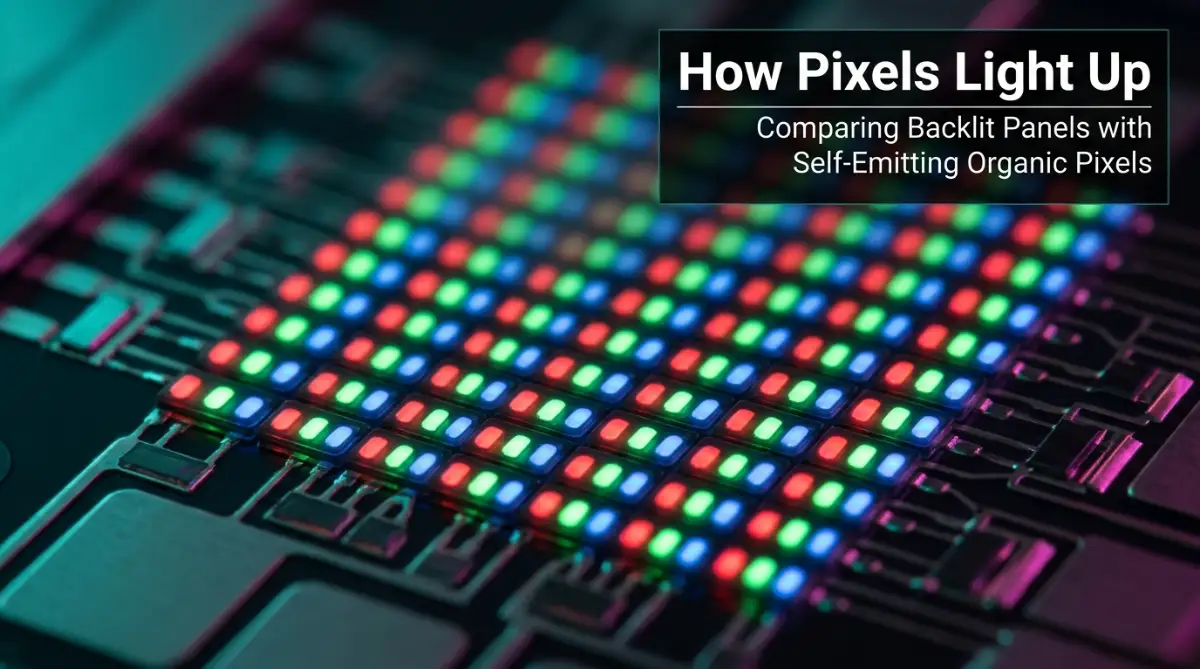
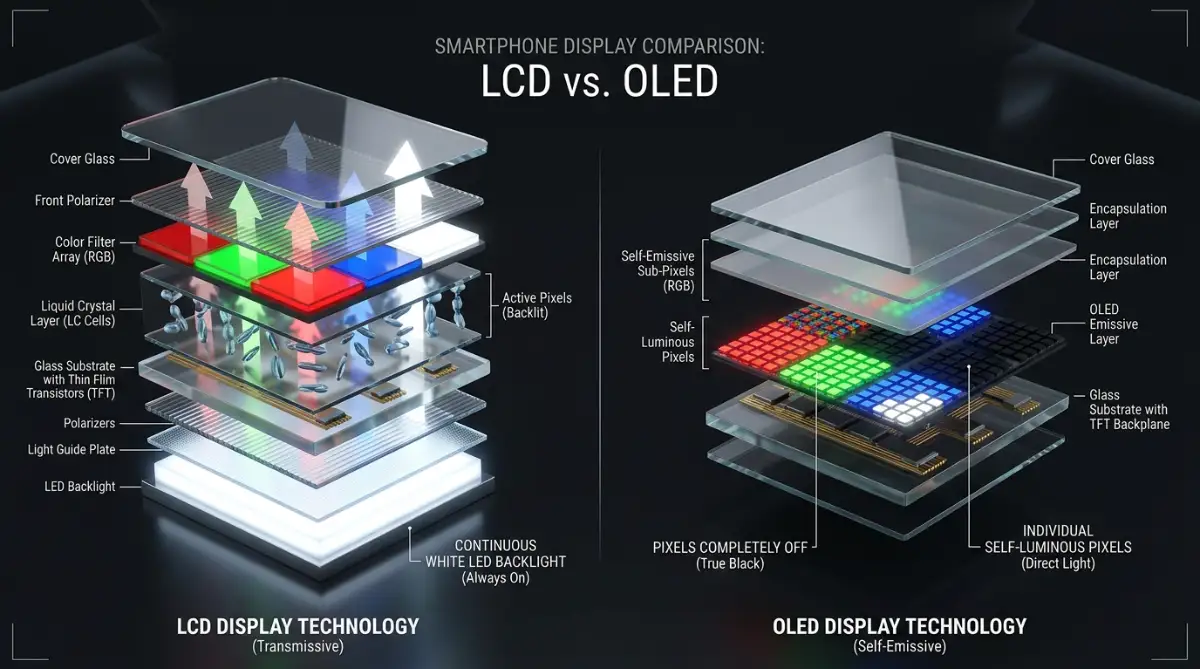
Think of an LCD screen like a window with mini blinds and a giant flashlight sitting right behind them. That flashlight—the LED backlight—stays on the entire time your phone screen is active. When your phone wants to show a dark night sky, those tiny liquid crystal blinds snap shut to block the light. But here is the catch: they can never block 100% of that flashlight beam. Some light always leaks through the edges, turning your deep blacks into a faint, washed-out grey.
The Inner Mechanics of Organic Light Emitting Diodes (OLED)
OLED flips this concept completely on its head. Instead of one big backlight behind the glass, an OLED panel packs millions of microscopic light bulbs that glow all on their own. When your screen needs to show black, it literally cuts the power to those specific pixels. They turn completely off, giving you true, absolute black with zero light bleed. That is why dark scenes in movies blend right into the darkness of your bedroom.
Color Reproduction and Picture Quality Differences
When you watch high-definition movies or browse high-resolution photos, the difference in color depth between LCD and OLED is instantly noticeable.
LCD panels use fixed LED backlights that pass light through color filters, producing bright and natural colors across the panel.
Many budget and mid-range mobile phones use Advanced Fringe Field Switching or IPS LCD screens, which offer accurate color representation.
However, because the LCD backlight stays continuously lit, dark tones in pictures get slightly contaminated by stray background light.
OLED displays deliver vibrant, deeply saturated colors that make graphics, video games, and photographs pop with visual life.
Because each OLED pixel produces its own light intensity, subtle shade gradients appear smoother and more realistic.
High Dynamic Range content, commonly called HDR, looks noticeably better on OLED screens due to the vast contrast gap between lit and unlit pixels.
Bright highlights stand out vividly right next to deep pitch-black shadows without any unwanted light bleed into neighboring screen areas.
Deep Black Levels and Contrast Ratios Explained
To truly appreciate phone screens, you need to understand what contrast ratio means for your everyday viewing experience.
Contrast ratio measures the brightness difference between the brightest white a display can produce and the darkest black it can render.
A traditional mobile LCD panel usually offers a static contrast ratio somewhere around 1000:1 or 1500:1.
This means the brightest white point on an LCD screen is about 1500 times brighter than its darkest black point.
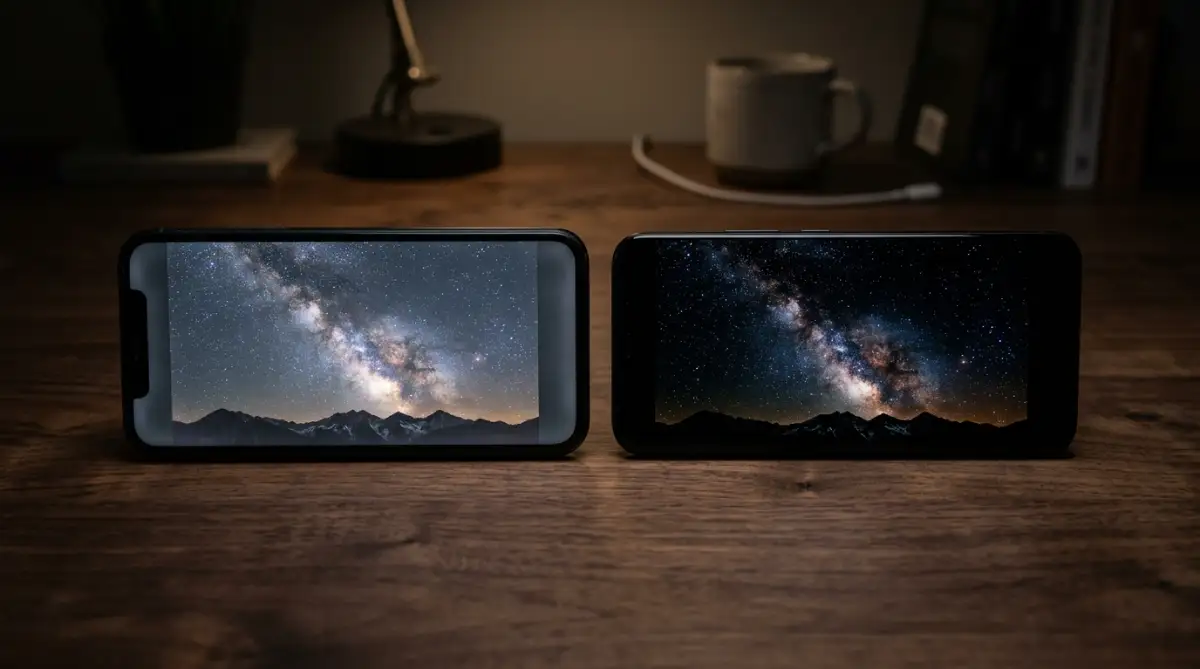
Because an OLED screen turns off its pixels completely to show black, the black brightness measurement drops to absolute zero nits.
When you divide any white brightness level by zero light output, you get a theoretical infinite contrast ratio.
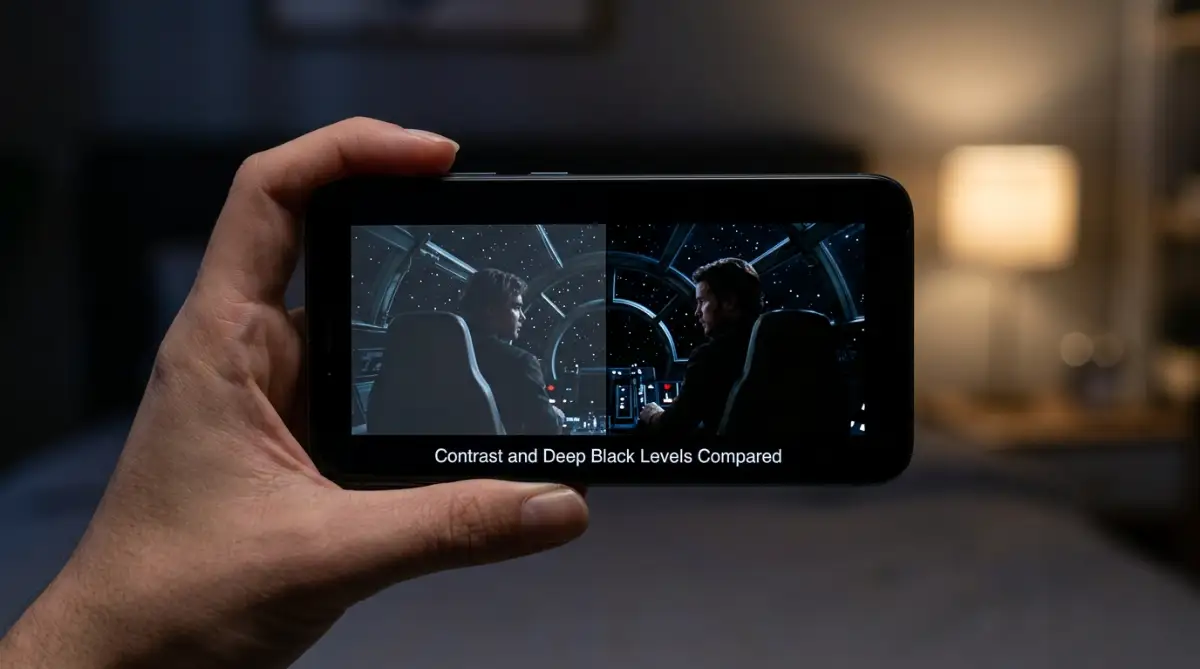
In real-life usage, this means dark movie scenes look truly dark instead of appearing like a murky grey fog.
Text printed against a dark background in reading apps looks crisp, sharp, and easy on human eyes.
Power Consumption: How Screen Tech Affects Your Battery
Battery drain is one of the biggest concerns for modern smartphone users who need their devices to last through long workdays.
The way LCD and OLED screens consume battery power differs dramatically depending on what content you display on your phone.
An LCD screen uses roughly the same amount of battery power whether you display a full white picture or a completely black image.
This happens because the LED backlight behind the LCD panel burns power continuously at whatever brightness level you select.
OLED screens consume electric power on a pixel-by-pixel basis.
If your screen displays bright white or bright yellow across the entire panel, an OLED screen burns a lot of battery energy.
However, if you switch your mobile apps or operating system to a dark mode interface, an OLED display saves massive amounts of battery power.
The turned-off black pixels on an OLED panel draw virtually zero current from your phone battery, extending daily screen-on time significantly.
📊 Real-Life Battery Drain Test (Dark Mode vs Light Mode)
Here is what happened when we tested both display types side-by-side on 70% brightness for 2 hours of continuous reading and social browsing:
Outdoor Visibility and Peak Brightness Performance
Using your smartphone under direct midday sunlight can be frustrating if your display lacks sufficient peak brightness output.
Modern high-end LCD panels can reach impressive, sustained brightness levels, often ranging between 500 and 1000 nits.
Because an LCD uses a dedicated backlight layer, it can maintain stable overall brightness across the entire screen without overheating easily.
OLED displays have made enormous technology strides, with flagship mobile OLED panels reaching peak burst brightness levels above 2000 nits.
These extreme brightness levels allow OLED screens to remain readable even under direct, harsh sunlight on bright summer afternoons.
However, an OLED screen usually cannot maintain its absolute peak brightness across a full white screen for very long periods.
To prevent panel overheating and pixel degradation, mobile thermal algorithms automatically dim the OLED brightness slightly after a few minutes.
For normal outdoor tasks like reading text messages or checking maps, modern high-quality versions of both panel types perform well.
Screen Burn-In and Image Retention Realities
One major technical concern that makes buyers hesitate when choosing OLED mobile displays is the permanent issue called screen burn-in.
Screen burn-in occurs when static visual elements stay displayed on a screen for hundreds of continuous hours at high brightness.
Icons like navigation bar buttons, battery percentage meters, or social media header bars can leave faint ghost images on the display.
This happens because the organic compounds inside individual OLED subpixels slowly degrade over long periods of constant electrical use.
When certain subpixels degrade faster than neighboring pixels, an permanent visual outline remains visible on light backgrounds.
Modern smartphone manufacturers use smart pixel-shifting software tricks and display warming guards to minimize burn-in risks significantly.
LCD mobile panels do not suffer from permanent organic burn-in because liquid crystals do not degrade in that specific manner.
An LCD screen might occasionally show temporary image retention after showing a static picture for hours, but it fades away quickly.
If you plan to keep the same mobile phone for five or six years, LCD panels offer long-term hardware stability.
🔍 Myth vs Fact: Smartphone Screen Realities
- Myth: Modern OLED screens will burn in within a year of normal use.
- Fact: With modern pixel-shifting tricks and auto-brightness enabled, most users can easily use an OLED phone for 3–4 years without noticing any permanent ghost marks.
- Myth: LCD displays always look cheap and ugly.
- Fact: High-grade IPS LCD panels produce exceptionally accurate colors that photographers love, without any risk of color shifting over time.
- Myth: Dark mode saves huge battery on every single phone.
- Fact: Dark mode only saves battery on OLED displays. On an LCD, the backlight stays fully powered on regardless of the background color.
Viewing Angles and Color Distortion Issues
When you share your phone screen with a friend sitting beside you, viewing angles determine how clear the display remains.
In cheaper LCD screens, looking at the display from extreme side angles causes colors to shift and contrast to drop sharply.
High-grade IPS LCD panels solve this problem well, offering wide viewing angles without severe visual distortion.
OLED mobile displays excel at preserving high contrast and deep black levels even when viewed from extreme side angles.
You can lay an OLED phone flat on a desk beside your computer keyboard and clearly read notifications without picking it up.
However, some OLED screens display a minor tilt phenomenon known as off-axis rainbowing or blue-tint shifting.
When you tilt certain OLED panels back and forth, white backgrounds can show a subtle cool blue tint across the glass.
This subtle shift is a light refraction trait of multi-layer organic OLED structures and varies by panel quality.
Refresh Rates and Smooth Touch Responses
Smooth scrolling down social media feeds and quick touch responses in fast games depend heavily on refresh rates and panel responses.
Refresh rate measures how many times per second the display redraws the image on your mobile screen, measured in Hertz.
Both LCD and OLED mobile panels can easily support high refresh rates like 90Hz, 120Hz, or even 144Hz.
However, response time—the time it takes for an individual pixel to change from one color to another—is where OLED wins easily.
OLED pixels change state almost instantaneously, often in less than a fraction of a millisecond, because they switch electronically.
LCD liquid crystals must physically rotate inside a liquid fluid layer to block or pass light, which takes slightly longer.
This physical rotation can occasionally cause faint motion blur or ghosting trails behind fast-moving objects on budget LCD screens.
On an OLED screen, animations and scrolling text appear crisp without visible trailing artifacts during fast scrolling motions.
💡Author's Pro Tip: Protecting Your OLED Investment
I learned the hard way that blasting your phone at 100% manual brightness while relying on dark mode can cause uneven subpixel wear over time. If you want your display to stay pristine for 4–5 years without any ghosting, keep Auto-Brightness enabled and let your phone's ambient light sensor do the heavy lifting!
Seeing Display Technologies in Action
Watch this breakdown video to see real side-by-side display comparisons, dark room testing, and outdoor sunlight visibility tests.
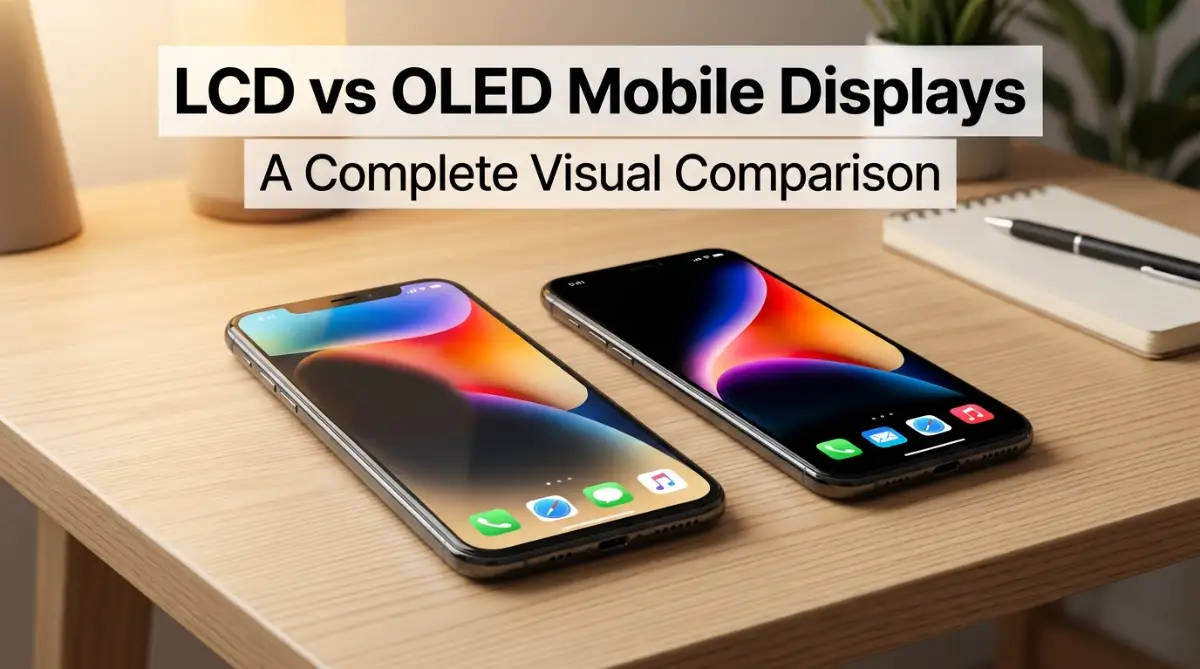
To help you see the difference with your own eyes, I recommend watching a real-world side-by-side display test. When you observe both panels side by side in a pitch-black room, the difference between LCD backlighting and true OLED pixel shut off becomes instantly clear:
💡 Note how the black borders disappear into the dark room on the OLED panel, while the LCD screen reveals a subtle glowing backlight border.
Side-by-Side LCD vs OLED Comparison Table
Manufacturing Costs and Mobile Phone Pricing Trends
The mechanical difference between these two technologies plays a massive role in how much a mobile phone costs at retail.
LCD display panels are mature, highly refined, and cheap to manufacture in large volume quantities.
Because LCD manufacturing equipment has been built out globally over decades, yield rates for LCD factories are extremely high.
This makes LCD panels the preferred display choice for budget-friendly smartphones and entry-level mobile tablets.
OLED panels require complex chemical manufacturing processes, clean vacuum rooms, and precise organic material deposition tools.
If a microscopic defect occurs during OLED panel production, the entire display glass sheet must often be scrapped.
These higher production costs mean OLED panels are usually found in mid-range devices, high-end smartphones, and flagship devices.
As manufacturing techniques improve over time, OLED panels are slowly becoming cheaper, but LCD remains the clear value champion.
Understanding Eye Strain and PWM Dimming Issues
Eye comfort is an important factor that display panel engineers take seriously when designing modern mobile screens.
LCD screens control screen brightness levels primarily by reducing the electric power supplied directly to the LED backlight.
This smooth method of brightness control is called Direct Current or DC dimming, which creates a steady flicker-free light source.
OLED displays often use a technique called Pulse Width Modulation, or PWM, to control how bright the screen appears.
Instead of reducing electric power to pixels, PWM turns the OLED pixels on and off rapidly thousands of times per second.
At high brightness levels, human eyes do not perceive this high-speed switching rhythm at all.
At low brightness settings in dark rooms, some sensitive individuals can feel subtle eye strain or mild headaches from PWM screen flickering.
Many modern OLED phone makers now include high-frequency PWM dimming or DC dimming software modes to help protect sensitive eyes.
Screen Repair Costs and Long-Term Value
Dropping your phone on concrete is bad enough, but your screen type decides how hard your wallet gets hit. When I cracked the LCD on my backup budget phone, a local repair shop fixed it for under $45 in thirty minutes. But when my cousin dropped his curved flagship OLED phone, the official repair quote was nearly $280—almost half of what the phone was worth! If you tend to drop your device often, keep replacement costs in mind before you buy.
Dynamic Refresh Rate and LTPO OLED Panels
As smartphone display technology advances, a newer type of OLED panel called LTPO has become popular in flagship devices.
LTPO stands for Low-Temperature Polycrystalline Oxide, a specialized panel backplane technology used in premium OLED screens.
Standard LCD and basic OLED mobile screens run at fixed refresh rates, such as 60Hz or 120Hz constantly.
An LTPO OLED display can dynamically shift its refresh rate anywhere from 120Hz down to just 1Hz automatically.
When you play a fast action game, the LTPO OLED panel runs smoothly at 120 frames per second.
When you read a static eBook or look at an always-on clock display, the screen drops down to 1Hz refresh rate.
Dropping down to 1Hz saves massive amounts of battery juice because the display updates its screen contents only once per second.
This dynamic refresh feature represents one of the biggest technology leaps in modern mobile displays.
Which Display Type Fits Your Personal Daily Needs?
Choosing between an LCD and an OLED mobile screen depends entirely on your daily usage habits, personal priorities, and shopping budget.
If you use your mobile phone primarily outdoors in bright environments, read a lot of web text, and want long-term hardware durability without worrying about burn-in, an LCD phone offers outstanding value for your money.
LCD mobile devices give you dependable picture clarity, lower purchase prices, and cheap repair costs if you accidentally crack the screen.
On the other hand, if you love watching dark cinematic movies, playing graphics-heavy video games, and using dark mode to maximize battery longevity, an OLED screen is well worth the extra cost.
The rich black levels, fast pixel response times, vivid color pop, and sleek slim phone designs make OLED panels the gold standard for visual entertainment.
By understanding how backlights compare against self-emitting pixels, you can confidently choose a mobile screen panel that fits your personal lifestyle perfectly.
Advanced Calibration Secrets for Long-Term Screen Health
Whether you end up choosing an LCD or an OLED panel, applying smart display habits will significantly extend your phone's battery life and physical hardware lifespan.
Small adjustments in your mobile operating system settings can instantly improve visual comfort and prevent unnecessary screen wear.
Optimizing Screen Color Profiles and Natural Gamma Modes
Most modern mobile operating systems ship with display color profiles tuned toward extreme saturation right out of the retail box.
Phone manufacturers purposefully push display colors into vivid or punchy modes to impress shoppers looking at phone screens under bright store lights.
While these saturated colors look bright initially, they strain human eyes during long reading sessions and distort actual photo colors.
Navigating into your mobile display settings and selecting a Natural, Basic, or Accurate color profile changes how subpixels render light.
On LCD displays, natural color modes reduce harsh blue backlighting output, giving web pages and eBook apps a warmer paper-like tone.
On OLED screens, switching to a natural color profile reduces excessive voltage flowing through subpixels, preventing premature subpixel degradation.
Professional screen testing engineers at Display Mate Display Benchmark Standards frequently highlight how calibrated natural color profiles prevent unnecessary voltage spikes across subpixels while providing superior visual comfort for late-night reading.
Accurate color rendering is also ideal when reviewing digital art or editing photos taken on your device, ensuring realistic lighting across every image frame.
Smart Dark Mode Strategies for Maximum Battery Efficiency
If your smartphone features an OLED or AMOLED display panel, enabling system-wide dark mode is one of the most effective ways to save daily battery power.
Because OLED pixels turn off completely when rendering pure black, dark UI backgrounds allow large sections of your screen to draw zero electrical power.
However, many popular mobile apps default to dark grey backgrounds rather than true OLED black themes.
Dark grey backgrounds still require your screen pixels to emit light, missing out on maximum potential power savings.
Whenever possible, explore individual app settings to enable pitch black or AMOLED black themes instead of standard dark grey layouts.
If you notice unexpected power drops even after tweaking screen settings, learning why your phone battery percent jumps and how to fix it can help you solve underlying battery calibration issues.
For LCD screens, dark mode does not save battery power because the backlight stays illuminated, but dark themes can still reduce nighttime glare and visual tiredness.
Managing Refresh Rates and Auto-Brightness Routines
High refresh rates like 90Hz or 120Hz make scrolling through web pages and system menus feel remarkably smooth and fluid.
However, running a mobile display continuously at high refresh rates forces your graphics processor and display driver to work much harder.
This extra processing work generates internal heat, which speeds up battery drain and accelerates hardware aging inside your phone chassis.
If your device supports adaptive or dynamic refresh rate switching, keep that feature turned on in your display settings menu.
Adaptive refresh rate allows your phone to jump up to 120Hz while your finger touches the glass, then immediately drop back down when reading motionless content.
Setting up auto-brightness is equally important for maintaining healthy screen thermal levels during hot outdoor weather.
Auto-brightness uses built-in light sensors to dim your screen indoors while boosting light output only when bright sunlight hits the glass.
Proper power management habits apply across all personal tech devices, much like understanding hardware speed and memory capacity when optimizing mobile and desktop computer performance.
Protecting OLED Panels Against Burn-In and Image Retention
Preventing static image retention on OLED displays requires simple daily habits that keep individual organic subpixels aging at an even rate.
The biggest cause of OLED burn-in is displaying bright, unmoving graphics—like static wallpaper logos or navigation icons—at maximum brightness for extended periods.
To avoid permanent ghost marks, set your phone screen timeout setting to thirty seconds or one minute of idle inactivity.
Avoid leaving your phone screen turned on at maximum brightness while sitting in a car dashboard phone mount on long road trips.
Rotating your home screen wallpapers periodically or using dark abstract wallpapers ensures that pixels across different screen zones get equal use.
If you use gestures instead of traditional fixed bottom navigation buttons, hide the navigation bar to prevent permanent button outlines on your display glass.
Extensive panel testing from the display labs at RTINGS Display Motion and Longevity Benchmarks confirms that uneven subpixel burn-in is almost entirely preventable when you combine auto-brightness routines with a modest 1-minute screen timeout.
Taking proactive steps to care for your mobile screen will keep your visual experience crisp and clear for many years.
Major Smartphone Display Mistakes That Ruin Panel Quality and Drain Money
Many smartphone owners unknowingly damage their mobile displays or waste money through common missteps that are easy to avoid.
One frequent mistake is keeping screen brightness set to 100% manually all day long, even while sitting inside dim rooms.
Running any display panel at maximum manual brightness generates excessive heat inside the battery compartment and display ribbon cables.
Overheating damages the chemical integrity of your phone battery while speeding up organic degradation in OLED subpixels.
Another major error occurs when buyers pick a new smartphone without looking at actual display specifications or real-life screen teardowns.
People often get distracted by flashy marketing terms like Ultra HD without checking whether the display is an LCD panel or an OLED screen.
When comparing mobile devices, looking at a comprehensive flagship smartphone comparison helps you see how different brands balance display tech against battery life.
Ignoring eye comfort settings late at night is another habit that leads to unnecessary visual discomfort and poor sleep quality.
Blue light emitted by bright phone backlights suppresses natural sleep hormones when viewed right before going to bed.
Failing to enable built-in eye comfort shields or night light filters forces your eyes to adjust constantly to harsh light wavelengths.
If you suffer from night eye strain, exploring simple ways to calm visual stress and fatigue can make your late-night reading habits far more restful.
Medical researchers and electrical engineers at the IEEE Display Ergonomics & PWM Research Standards have documented that low-frequency PWM flicker can trigger eye strain and mild tension headaches in sensitive individuals when viewing OLED screens in low-light environments.
Another costly blunder is replacing a cracked original screen with ultra-cheap, uncertified third-party replacement panels.
When people break their phone glass, they often visit unauthorized repair shops to save money on display replacement costs.
Cheap third-party LCD panels usually have weak backlight brightness, poor touch sensitivity, terrible viewing angles, and heavy battery power drain.
Cheap replacement OLED panels often lack proper thermal protection layers, causing rapid battery drain and early panel failure.
Investing in authentic manufacturer screen replacements ensures your device maintains its original touch response rates, color accuracy, and waterproof seals.
Frequently Asked Questions About Phone Screens
1. Can I get screen burn-in if I keep my OLED phone on auto-brightness?
It is extremely unlikely under normal daily use. Burn-in happens when bright static icons stay on screen at 100% manual brightness for hundreds of hours. Auto-brightness dims the screen indoors, keeping your pixels healthy for years.
2. Why does my head hurt when I read on an OLED phone in the dark?
Many OLED displays use rapid light pulsing (called PWM dimming) to control brightness. Sensitive eyes can pick up this high-speed flicker at low brightness settings, leading to eye tiredness. Switching on DC Dimming in your settings usually fixes this.
3. Which screen type is better for gaming?
OLED is noticeably better for fast-paced mobile gaming. OLED pixels change colors in less than a millisecond, giving you zero ghosting or blur when you quickly pan the camera in shooter games.
4. Is an LTPO OLED screen worth the extra money?
Yes, if battery life matters to you. LTPO tech automatically slows the screen down to 1Hz when you read still text and ramps up to 120Hz when you scroll, giving you silky-smooth speed with great power savings.
5. How can I tell what display panel my current phone has?
Open a pure black image full-screen in a pitch-black room at maximum brightness. If your screen glows softly with a grey tint, it is an LCD. If it looks completely turned off and pitch black, it is an OLED.
Choosing Your Ideal Display with Confidence and Clarity
Selecting between an LCD and an OLED mobile screen does not have to feel overwhelming when you focus on your actual daily routines.
LCD mobile screens remain a practical, reliable, and cost-effective choice for people who want long-lasting display stability without burn-in worries.
OLED displays represent the pinnacle of mobile visual technology, delivering rich contrast, deep black levels, vivid colors, and exceptional power efficiency in dark mode.
By applying smart brightness habits, setting up automated dark themes, and choosing authentic display replacements, you can enjoy stunning visuals on any mobile screen panel.
I spent years ignoring screen specifications until a bad display purchase opened my eyes to how much panel quality impacts daily phone enjoyment.
Taking a few minutes to check your display panel settings today will instantly transform how you watch videos, play games, and read on your device!
Disclaimer:
This article is published solely for educational, informational, and technical comparison purposes regarding mobile device hardware display technologies. All product references, technical descriptions, and display specifications are discussed without commercial sponsorship, brand endorsements, or direct sales promotion. Display performance, battery consumption figures, and panel lifespans can vary depending on individual user habits, environmental factors, brightness levels, device software updates, and specific hardware manufacturing standards. Always refer to your official device manufacturer guidelines for specific repair instructions, safety guidelines, and warranty policies.